Take the surprises out of your portfolio management in Jira
Share on socials

Take the surprises out of your portfolio management in Jira

Georges Petrequin
Georges Petrequin
Jay's profile picture on a mint background
Jay Prakash
Darren Ching's profile picture on a mint background
Darren Ching
Published on 20 February 2026
19 min read
An illustration of a project board with a custom hierarchy and timeline overlaid on top
Georges Petrequin
Georges Petrequin
Jay's profile picture on a mint background
Jay Prakash
Darren Ching's profile picture on a mint background
Darren Ching
Published on 20 February 2026
19 min read
Jump to section
Are you doing portfolio management in Jira?
Your team needs the details, but leadership needs the story
Where Jira falls short for true portfolio management
Four portfolio management questions every team asks every week
Question #1: 'How are we doing right now?'
Question #2: 'Why are we behind?'
Question #3: 'What's the next blocker?'
Question #4: 'Can we show this to the leadership team?'
Choosing the right portfolio management tool for your team

Your portfolio management tool should give you answers in minutes, not after weeks of configuration. Here's how to get cross-project, portfolio-level visibility in Jira from the data you already have.

Your Monday team check-ins, the daily standups, and your Friday reports all exist to answer a variation of one question: 'What's the next thing that could jeopardise my delivery?'
Portfolio management is surprise management. You're surfacing the dependency that's about to become a blocker or catching the key milestone that's drifting before leadership asks why.
I recently spoke with Jay Prakash (Senior Product Marketing Manager) and Darren Ching (Product Manager) from the Hierarchy for Jira team about what portfolio managers actually need from their tooling, and the conversation kept coming back to one core idea: avoiding surprises.

Key takeaways:

  • Portfolio management is about avoiding surprises: surfacing blockers, drifting milestones, and cross-project risks before they escalate. But, true portfolio-level visibility is difficult to achieve in native Jira.
  • Most teams work around this by exporting data to spreadsheets, jumping between tools, upgrading to Jira Premium, or investing in enterprise add-ons, all of which come with trade-offs.
  • Hierarchy for Jira gives you cross-project portfolio visibility directly in Jira, reading your existing work items, links, and relationships within and across projects to create a custom hierarchy and Gantt timeline, all using your existing Jira data.
  • The visibility you get thanks to tools like baselines, dependency lines, and critical scope highlights help you answer your daily portfolio management questions, like 'How are we doing?', 'Why are we behind?', 'What's the next blocker?', or 'Can you show leadership?', in seconds rather than hours.
  • Save custom views for different audiences, share them via live URLs, Confluence embeds, or dashboard gadgets, and go from install to full portfolio-level visibility in about five minutes, with no long onboarding or scripting required.

Are you doing portfolio management in Jira?

If you're responsible for the delivery of more than one project at a time, you're likely doing some kind of portfolio management, or at least involved in aspects of it. Portfolio management in native Jira means tracking multiple projects, releases, or team deliveries side by side so you can spot risks, balance priorities, and keep stakeholders informed across everything your team is delivering.
The challenge is that Jira is best for managing work within a single project at a time.
Once you need to see how work in one project affects another, or give leadership a cross-project timeline of your whole delivery, you're working around Jira's limitations rather than with them.

Your team needs the details, but leadership needs the story

Most portfolio managers need to communicate with two core audiences with different needs. You'll need to share information with both audiences in the same week, and sometimes even in the same meeting.
Execution teams need granular tracking: What's blocked? What needs to be done before a certain date? Where are the dependencies that could knock everything sideways? What work do we need to prioritise today?
Leadership wants the big picture: 'How are we doing? Anything that jumps out?' They need information that stimulates discussion around overall progress and potential risks.
As Jay told me, '[Good portfolio management] is all about keeping the right people aware of progress and taking them on a journey, reducing that element of surprise.'
The problem is, most portfolio management tools force you to pick one core audience to build your system around, or leave you cobbling views together manually to serve both.
Jay's profile picture on a mint background
[Portfolio management] is all about keeping the right people aware of progress, taking them on a journey, and reducing that element of surprise.
Jay Prakash
Senior Product Marketing Manager

Portfolio management shouldn't mean rebuilding your views outside Jira every week

Native Jira lets you pull work from multiple projects into a single view using JQL, but it doesn't give you an intuitive way to see that work in a Gantt chart that combines your custom hierarchy, dependencies, and schedule all in one place.
If you want to understand how work in Project A affects Project B over time, you're often building that view yourself.
So what do most teams actually do?
  • Stitch together spreadsheets. You export data from multiple projects, paste it into Excel, and build your own view. Then you do it again next week. It works, but is it really a good use of your time? At the back of your mind, you're sure there's a way you could do this automatically.
  • Jump between tools. You've got Jira for tracking individual work items, but you still need to use other tools like Excel or Miro to visualise your whole portfolio of projects. There's a high management overhead to keeping the information up to date across both, and an awful lot of context-switching, which is time you're not spending on actual delivery.
  • Upgrade to Jira Premium with Plans. The cross-project roadmap in Jira Plans solves the visibility problem, but requires a Premium licence. If visibility of your portfolio over time is your main gap, that's a significant investment for a single capability.
  • Invest in enterprise add-ons. There are popular portfolio management apps on the Atlassian Marketplace offering serious features, but they come with an equally serious onboarding process. Jay highlighted: 'The barrier to entry for a lot of the portfolio management tools out there is pretty immense, simply because there are so many things to configure and set up at the very beginning before you even start using it.'
ApproachCostSetupThe trade-off
Manual spreadsheetsFreeHighData goes stale fast, hours of rebuilding reports every week
Jumping between toolsMediumMediumNo single source of truth and requires ongoing management overhead
Jira Premium with PlansHighMediumRequires a Premium/Enterprise licence across your org for visibility only one team might need
Enterprise add-onsHighHighPotentially weeks of configuration and steep learning curve
There's nothing inherently wrong with taking any of these approaches, but they all involve trade-offs: cost, complexity, or a continuous manual management overhead.
As a portfolio manager, these will all make your job harder than it should be.
Luckily, there's a more practical way to do things:

Four portfolio management questions every team asks every week

The takeaway from our conversation was that portfolio managers (or anyone juggling multiple projects) don't always need the tool with the most features. What they need is a tool that lets them go from question to a clear answer they can bring to their team and stakeholders.
Hierarchy for Jira is a Jira Cloud app that gives portfolio managers the cross-project visibility you need, right inside Jira. The app reads your existing Jira data, including every work item, link, and parent-child relationship, then lets you visualise it all in a custom hierarchy and a cross-project Gantt timeline.
There's no data to import or a parallel system to maintain. You just install the app (start with the free trial), open it, and start seeing how all of your work connects to the bigger picture.
As Darren said in our chat, 'Sometimes all you want, as a portfolio manager, is to understand: how are we doing right now? What do we need to look at? Anything that jumps out?'
Here's what your new level of visibility, with Hierarchy for Jira, looks like in practice.

Question #1: 'How are we doing right now?'

This question is misleadingly simple. When you're managing multiple projects across different teams, it can be hard to capture the nuance required for a clear answer.
With Hierarchy for Jira, this takes seconds, as you can instantly visualise your schedule over time and see which work items are on track or falling behind. Here's how to answer it.
Open Hierarchy for Jira from your apps sidebar. You'll see a project selector and a JQL search bar at the top.
Click 'Switch to JQL' and type your query. If you're running a program with three projects and 40+ epics, your query might look like:
project in (MOBILE, API, PLATFORM) AND type in (Epic, Initiative)
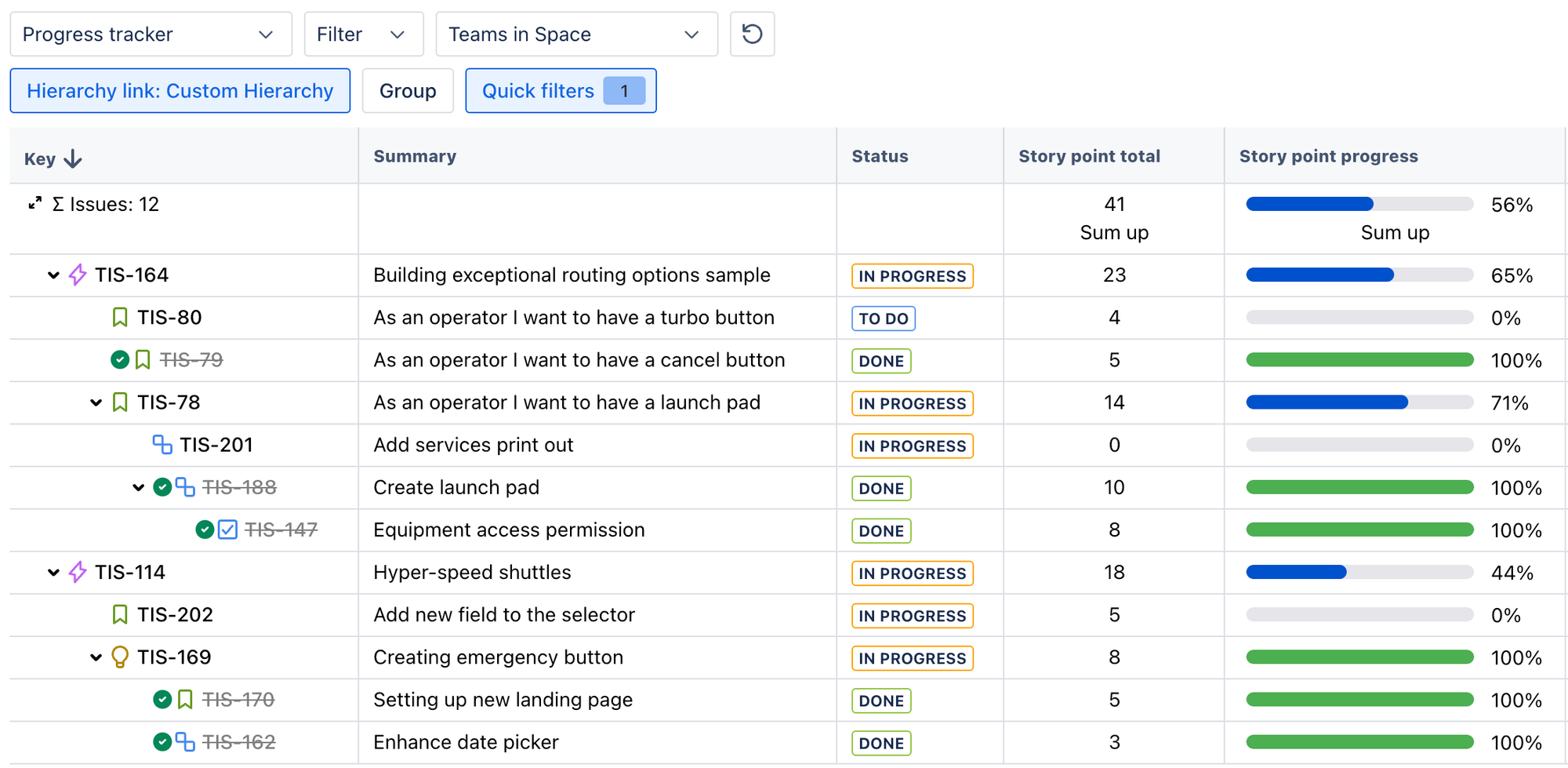
Hit enter, and your work items appear in a nested tree view that shows how everything connects, from initiatives down to subtasks.
The custom hierarchy in Hierarchy for Jira
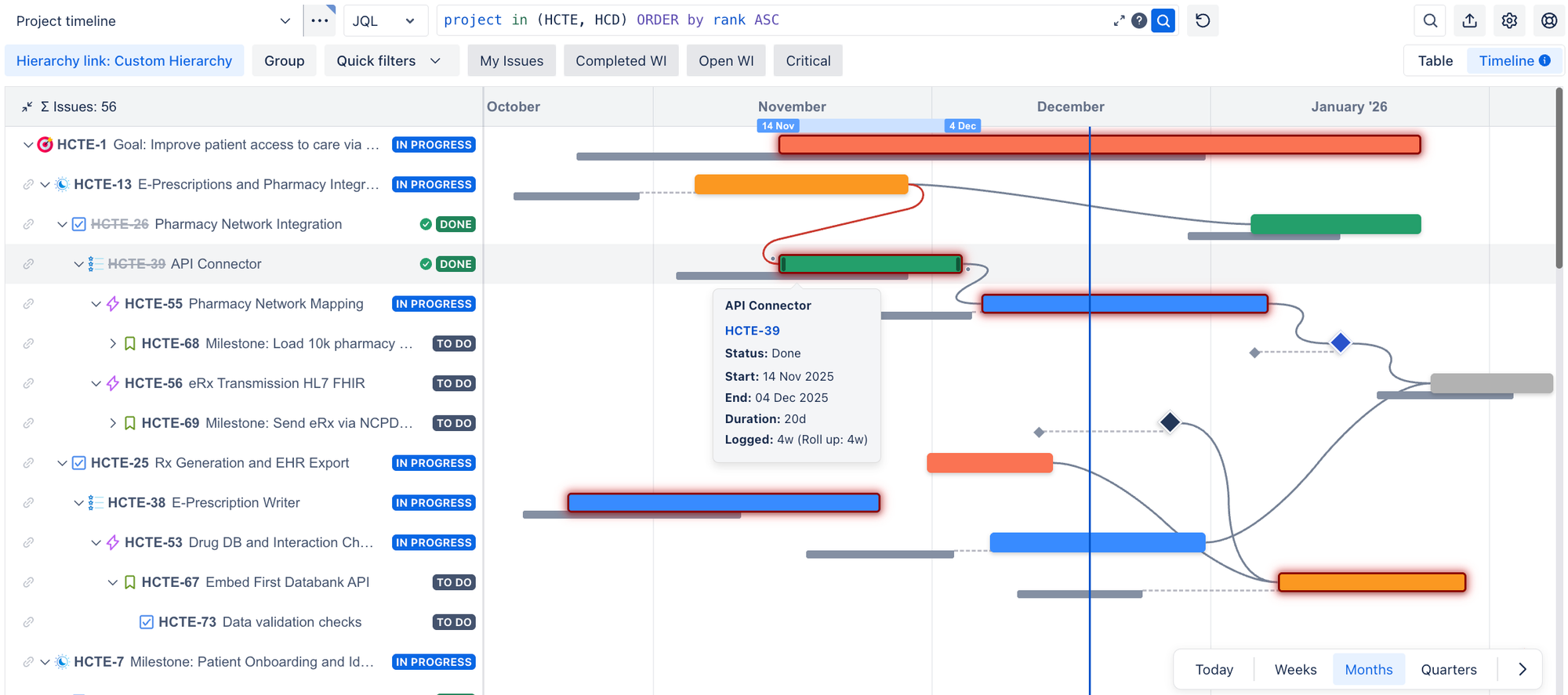
Next, click the 'Timeline' toggle in the top-right corner. Your tree view transforms into a Gantt-style timeline with every work item positioned by its dates.
You can switch between weekly, monthly, and quarterly views depending on whether you're preparing for a sprint or a portfolio review. Hover over any work item bar to see its status, dates, duration, and estimate fields, all without clicking into individual issues.
Hierarchy for Jira's cross-project timeline
Darren put it succinctly: 'All you have to do is enter the JQL to see what work items you'd like to include, structure them however you'd like to see them, and you're good to go!'
We've seen the benefits of this with customers, too. Darren recently spoke to a customer (let's call them Sara), and before using Hierarchy for Jira, Sara had been tracking projects in isolation. This meant toggling between separate saved views and monitoring each project individually. Sara couldn't pinpoint dependencies across projects because there wasn't a simple way to see multiple Jira projects together in a single view, given that they were on a Jira Standard plan.
When she started using Hierarchy for Jira and could pull in multiple projects and visualise them in a single view for the first time, she immediately spotted connections she'd been missing.
Sara can now report to stakeholders with confidence about whether the team's projects are on track and always knows whether or not her projects within the overall portfolio are moving in the right direction.
Darren's profile picture on a mint background
Enter the JQL to see what work items you'd like to include, structure them however you'd like to see them, and you're good to go!'
Darren Ching
Product Manager, Hierarchy for Jira

Question #2: 'Why are we behind?'

This is where baselines in Hierarchy for Jira come in.
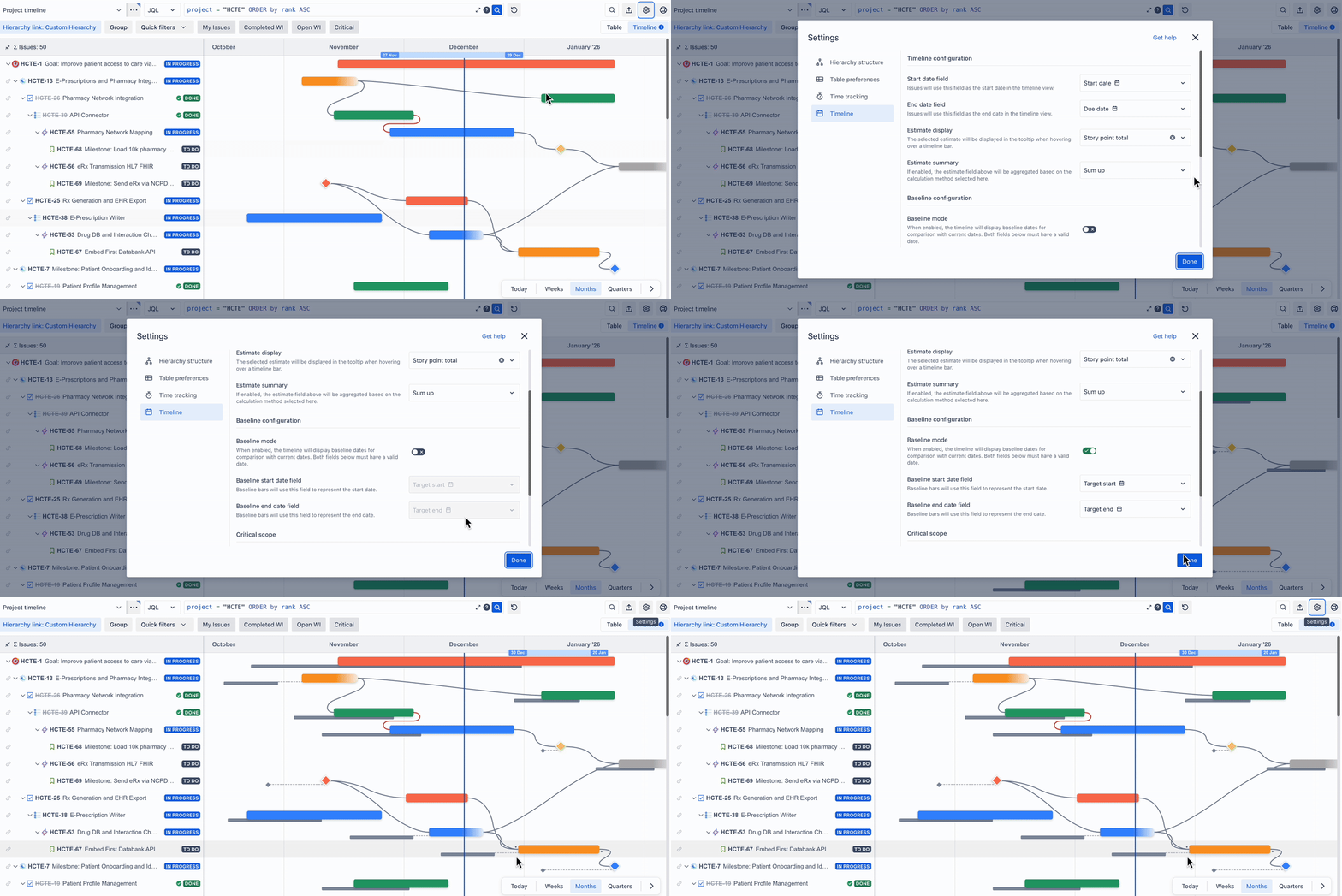
Baselines let you compare your original plan against what's actually happening in a single view. To set it up:
  1. Open up your timeline view and select the 'Settings' button.
  2. Select the 'Timeline' tab.
  3. Toggle on 'Baseline mode'.
  4. Choose the date fields that represent your original plan. By default, these are 'Target Start' and 'Target End', but you can select any date fields your team uses!
Enable baselines in Hierarchy for Jira to see a grey line appear under your timeline bars
Once enabled, a grey bar appears beneath each work item in your timeline showing your original planned dates. A dotted line connects the grey bar to the actual timeline bar, so you can see at a glance exactly how far each piece of work has drifted from the plan. To see the original start and end dates, just hover over the baseline bar.
When a stakeholder asks why something slipped, you can show exactly when and where the schedule shifted, instead of digging through Slack threads and Jira notifications from two weeks ago to piece together an answer.
The answer's already visible, no forensic work or scripting required.

Question #3: 'What's the next blocker?'

Knowing you're behind is one thing. Knowing what's about to go wrong next is what lets you stay ahead of it. What are the dependencies that could knock your timeline sideways, and when do you need to resolve them before they cascade?
It's the question Jay hears most from the portfolio and project managers he speaks to: 'What is the next thing that could jeopardise my delivery? What are those blockers, and when do I need to solve them before they impact the rest of the project?'
This is where Hierarchy for Jira's approach to visualising linked work items comes into play.
Hierarchy for Jira reads every parent-child and linked-work-item relationship in your Jira project and pulls your work items into a nested tree view that shows how work connects from your top-level initiatives, right down to your subtasks. If one work item blocks another, that relationship is already visible in the tree.
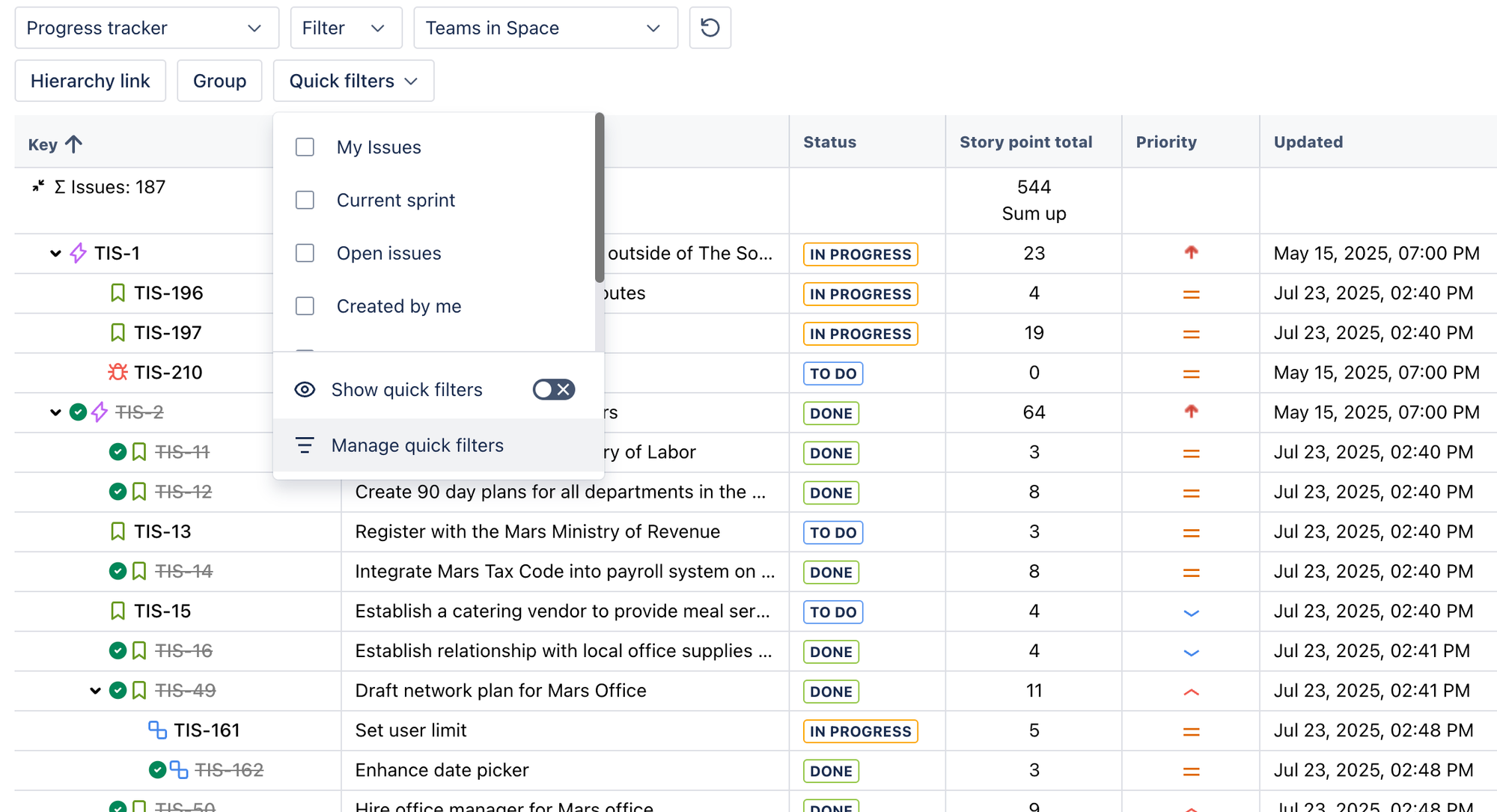
You can also use Quick Filters to set for different views based on your needs. For example, you might have a Quick Filter for work items in your current sprint, work items by team, project, status, or anything else you need.
Quick Filters in Hierarchy for Jira
You can select the 'Blocks' link type from the tree configuration menu and toggle 'Hide Default Hierarchy' to strip the view back to just your dependency chains, showing you a clear view of what's blocking what, all without opening a single work item.
Then switch to the timeline view to see your dependencies mapped out in an even more visual way.
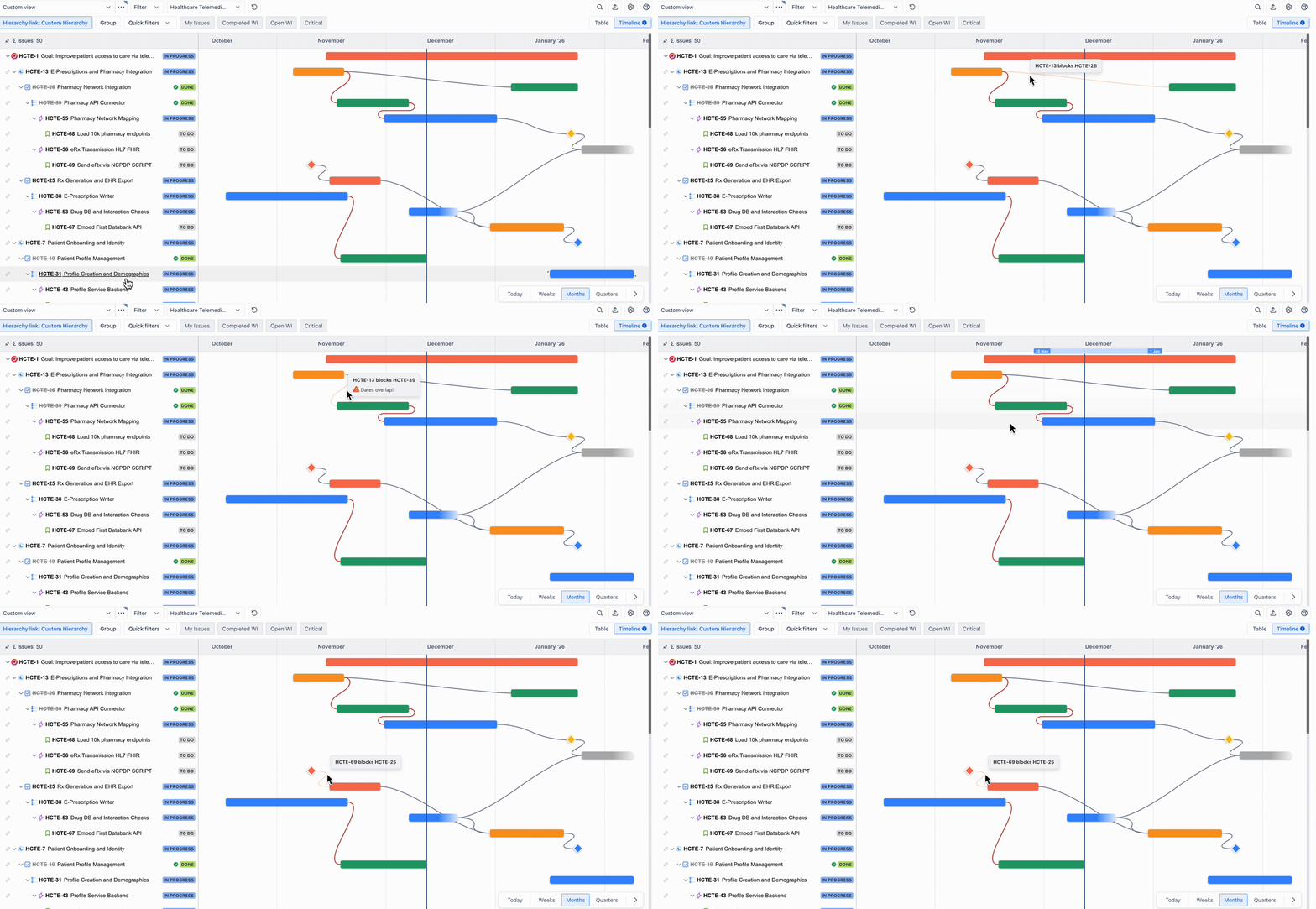
Dependency lines automatically appear between linked work items on your timeline. When there's a scheduling conflict—the end date of one item falls after the start date of the next item—the line turns red. You can spot the gap immediately, rather than discovering the conflict in next week's standup.
Dependency lines over your timeline in Hierarchy for Jira
You can also draw new dependencies directly on the timeline. Hover over a timeline bar, and you'll see grey dots on either side. Drag the right-hand dot to another work item to create a 'blocks' relationship, or drag the left-hand dot to create a 'blocked by' relationship.
Need to reschedule? Drag either end of any timeline bar (or grab the whole timeline bar), and the underlying Jira dates update instantly. You'll see the downstream impact on dependent items right away.
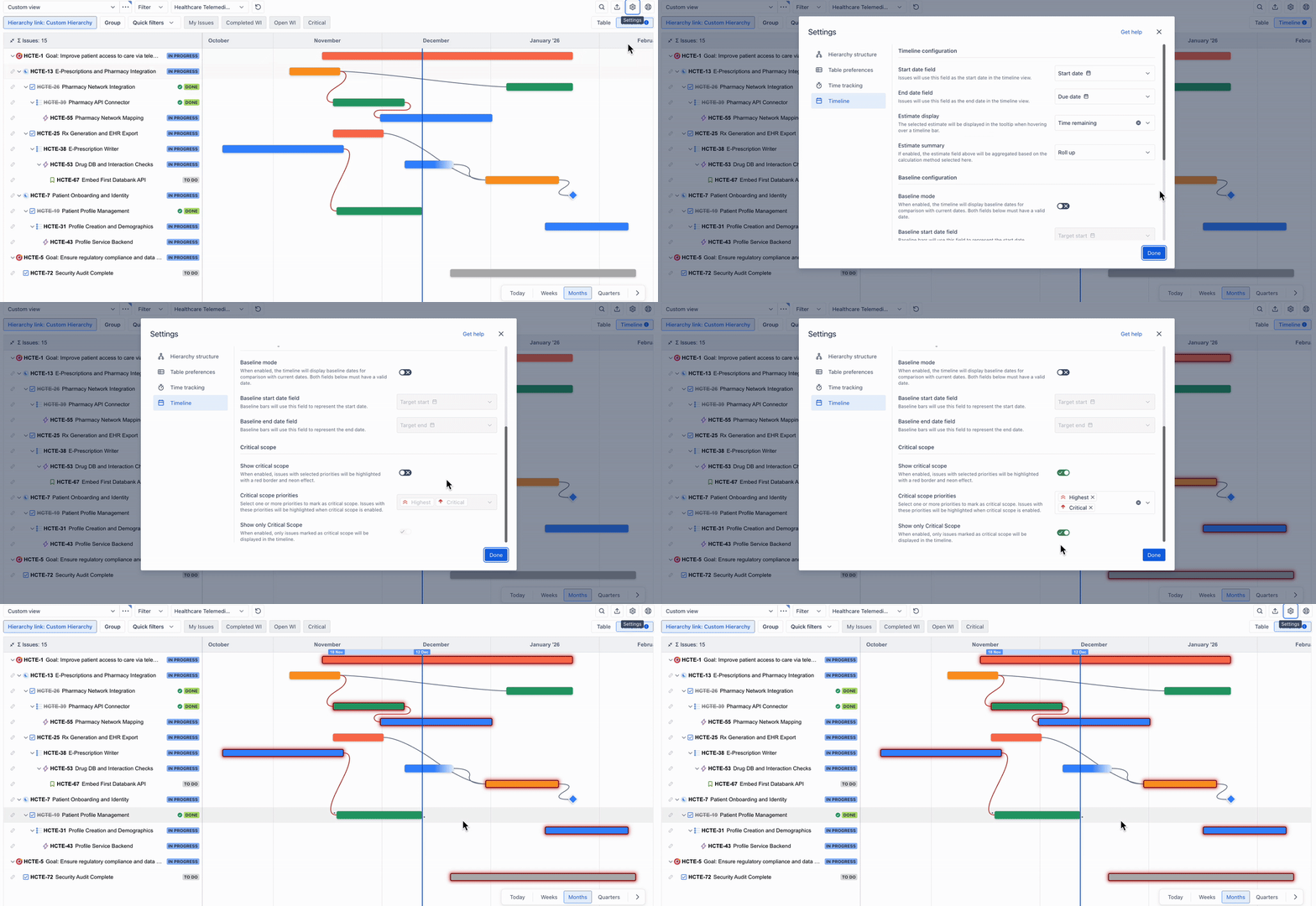
Then there's critical scope, which highlights at-risk work items. To see it in action, open your timeline settings, toggle 'Show critical scope' on, and select which priority levels to flag, for example, High, Major, or Critical.
Any matching work items will be highlighted in red on the timeline. You can even toggle 'Show only critical scope' to filter out everything else and focus purely on the work that could derail delivery.
Critical scope in Hierarchy for Jira highlights at-risk work items in red
When your exec team wants a heads-up on risks, the answer's already visible, and there's no need to build a separate report.

Question 4. 'Can you show this to the leadership team?'

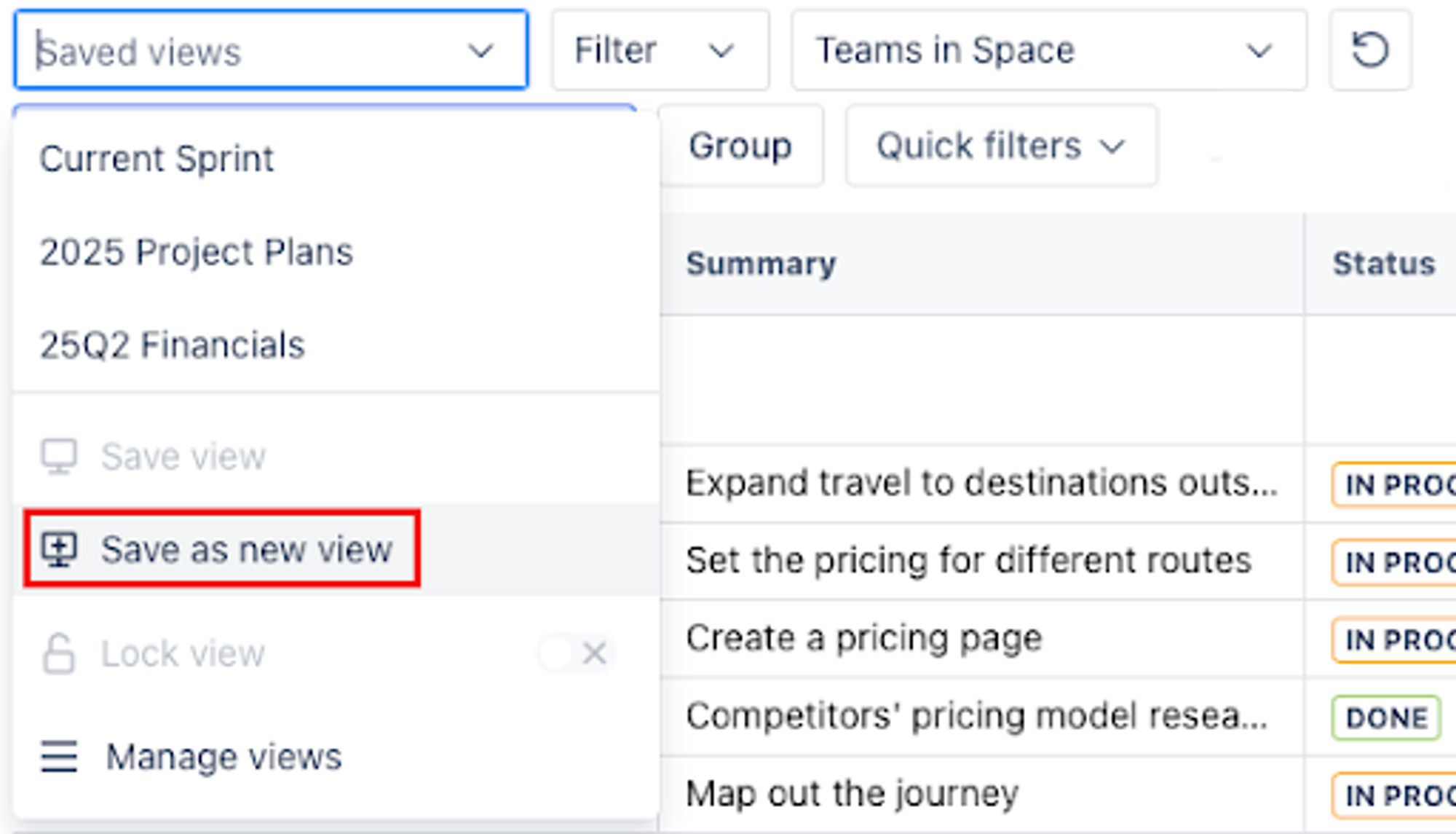
Once you've built a view with the right filters and structure, click 'Create New View' to save it.
Save as a new view option in Hierarchy for Jira
Give it a name that makes sense for the audience, such as 'Q2 Portfolio Status' or 'Leadership Review'.
From there, you have three ways to share it:
  1. Share a live URL. Click the 'Export and share' button and copy the shareable link. Anyone who opens it sees the live, real-time view, filtered by their existing Jira permissions, so they only see what they're authorised to view.
  2. Embed in Confluence. Paste that same URL into a Confluence page as an iframe, and your whole team now has a live portfolio view that updates itself so they can self-serve your reports.
  3. Export a snapshot. If you need something for a slide deck, select 'Export Image' from the same menu. Choose your date range, preview it, export a PNG, then drop it into a deck or Slack channel.
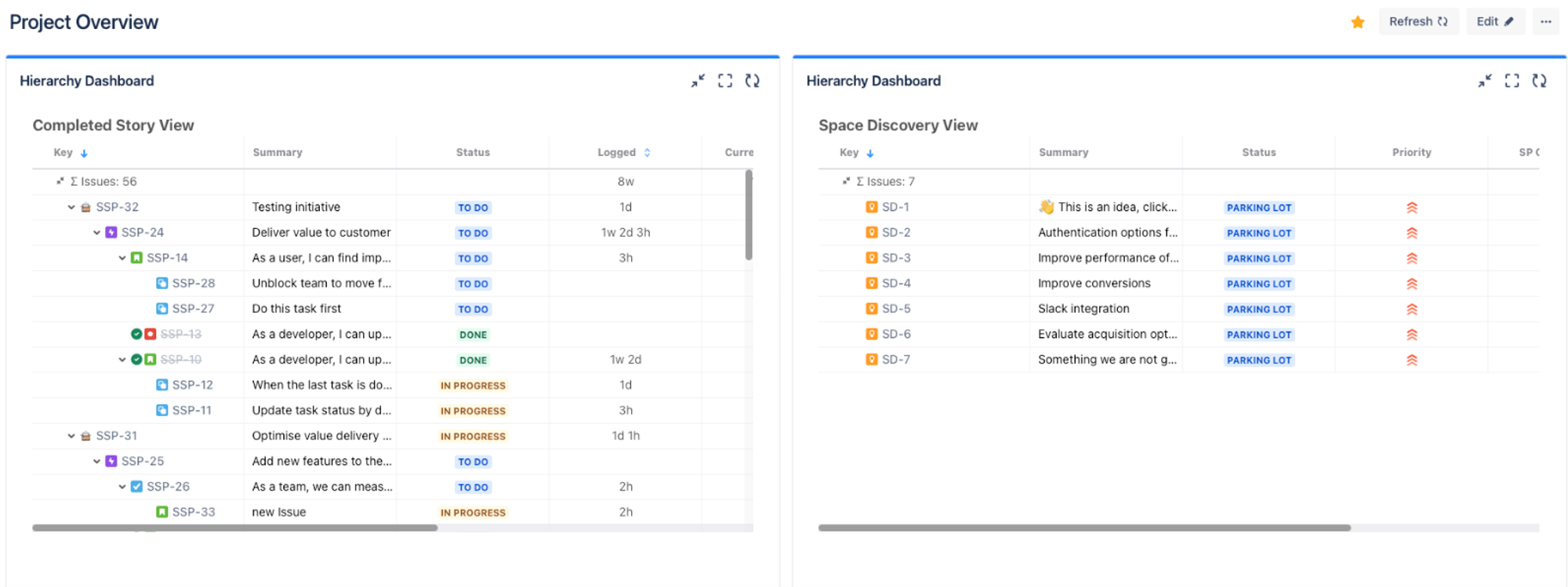
  4. Add it to your dashboard as a gadget. For quick access to specific views, add a Hierarchy for Jira gadget to your dashboard, and anyone with access can see your project status at a glance without digging for details.
See your custom views as a dashboard gadget
Your stakeholders can check progress whenever they need to. No Slack pings asking for a status update, fewer interruptions, and more confidence in the status of your delivery.
Plus, you can save as many custom views as you need and switch between them at any time, making quick context gathering quick and simple.
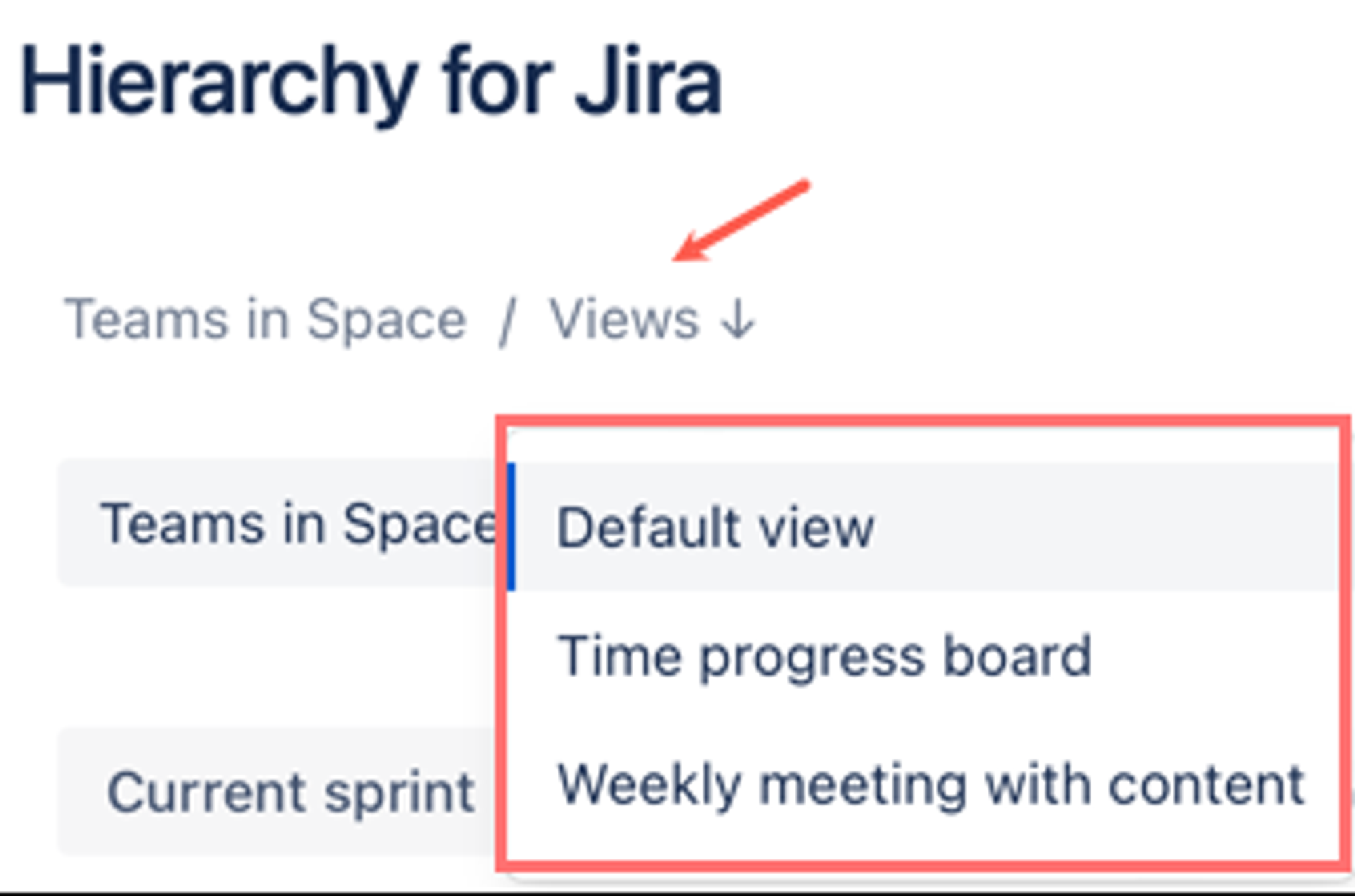
Switch between saved views in Hierarchy for Jira in a click
Between your dependency views for the execution team and your saved portfolio views for leadership, you're now serving both audiences from a single tool, with no manual stitching required.

Choosing the right portfolio management tool for your team

For most teams managing portfolios in Jira, the real question isn't 'which tool has the most features?', but 'how fast can I get the answers I need?'
If your portfolio management needs extend to scenario planning, critical path calculation, complex resource management, or capacity modelling, options like Jira Plans and other more costly portfolio management apps are made for that level of sophistication. They come with more configuration and a steeper learning curve, but that depth exists for a reason.
Hierarchy for Jira takes a different approach. Think of it as a portfolio visualisation tool. It reads your native Jira data and gives you a cross-project timeline with dependencies, risks, milestones, and baselines highlighted. You can roll up and sum data through your entire hierarchy, save custom views, and share them with stakeholders via shareable links, dashboard gadgets, or Confluence embeds.
Because everything runs on your native Jira data, there's no syncing from duplicate sources of truth, no stale data, and no second system to manage. Install the app, open it, and your work is automatically visualised in a custom hierarchy and timeline, giving you an instant view of every work item and how it connects to the bigger picture across your portfolio.
For most teams, a faster, more contextual lens on the project data you already have is exactly what you need.


Five minutes to better portfolio visualisation with Hierarchy for Jira

Setting up a portfolio view in Hierarchy for Jira takes about five minutes:
  1. Install Hierarchy for Jira from the Atlassian Marketplace.
  2. Write a JQL query (or select from one of your existing Jira filters) to pull in the projects you want to see.
  3. See how every work item connects to the bigger picture in the custom hierarchy.
  4. Switch to timeline view to see how work and risks schedule out over time.
  5. Create a new saved view and share it with your team.
No consultants, no training sessions, no learning curve full of new terminology!
As Darren explained: 'When you try and do this on other traditional portfolio tools, the onboarding is pretty heavy. There's a lot of configuration that needs to be done and a lot of new terminology that people need to learn as well.'
With Hierarchy for Jira, you're up and running in five minutes.
If you're currently spending more time building views of your portfolio than actually managing it, then see how Hierarchy for Jira can help you with a completely free 30-day trial!
Jay Prakash's profile picture on a mint background

Ready to start seeing the bigger picture?

Hi, I'm Jay, Senior Product Marketing Manager for Hierarchy for Jira. If you'd like to see how Hierarchy for Jira can help you visualise your portfolio and focus on what matters, then you can start a 30-day free trial of the app on the Atlassian Marketplace.
Prefer a quick tour first? Book a walkthrough with our team, and we'll help you set it up for your workflow!
Written by
Georges Petrequin
Georges Petrequin
Content Marketing Manager
Georges is a Content Marketing Manager at Upscale with a focus on our Jira apps. He spends his time crafting content that helps our customers solve their everyday work pain points and get more out of their Atlassian tools.
Jay's profile picture on a mint background
Jay Prakash
Senior Product Marketing Manager
Jay Prakash is the Senior Product Marketing Manager at Upscale, bringing over 20 years of experience in marketing and sales. Driven by a deep curiosity and passion for technology, Jay focuses on exploring new use cases and helping our customers realise value in their organisations using our apps.
Darren Ching's profile picture on a mint background
Darren Ching
Product Manager
Darren is the Product Manager for Hierarchy for Jira at Upscale. He focuses on turning customer feedback into features and improvements that empower teams to bring more clarity and structure to their work and get the most out of Hierarchy in Jira.