Contact us
Protected Custom Fields logo

Protect sensitive custom fields in Jira and JSM Cloud without restructuring your entire instance

Control who can view and edit sensitive Jira and JSM custom fields without duplicating spaces, creating complicated permission schemes, or moving data out of your Atlassian tools altogether.
An illustration of a Jira board with a set of work items overlaid on top, showing custom fields marked out with asterisks.

Field-level security for Jira and JSM, without the workarounds

Jira and Jira Service Management (JSM) Cloud don’t offer native field-level permissions, so teams often end up locking down entire spaces and work items just to protect one sensitive field.
Protected Custom Fields gives you role-based access control (RBAC) at the custom field level, using the Jira groups you already manage. Protect fields like salaries, contract values, legal notes, incident details, and personally identifiable information (PII) while your teams keep collaborating in the same spaces and work items.
Protected values are AES-256 encrypted and only decrypted for authorised users, reinforcing the principle of least privilege (PoLP). Every permission change and field event is recorded in a dedicated audit log.

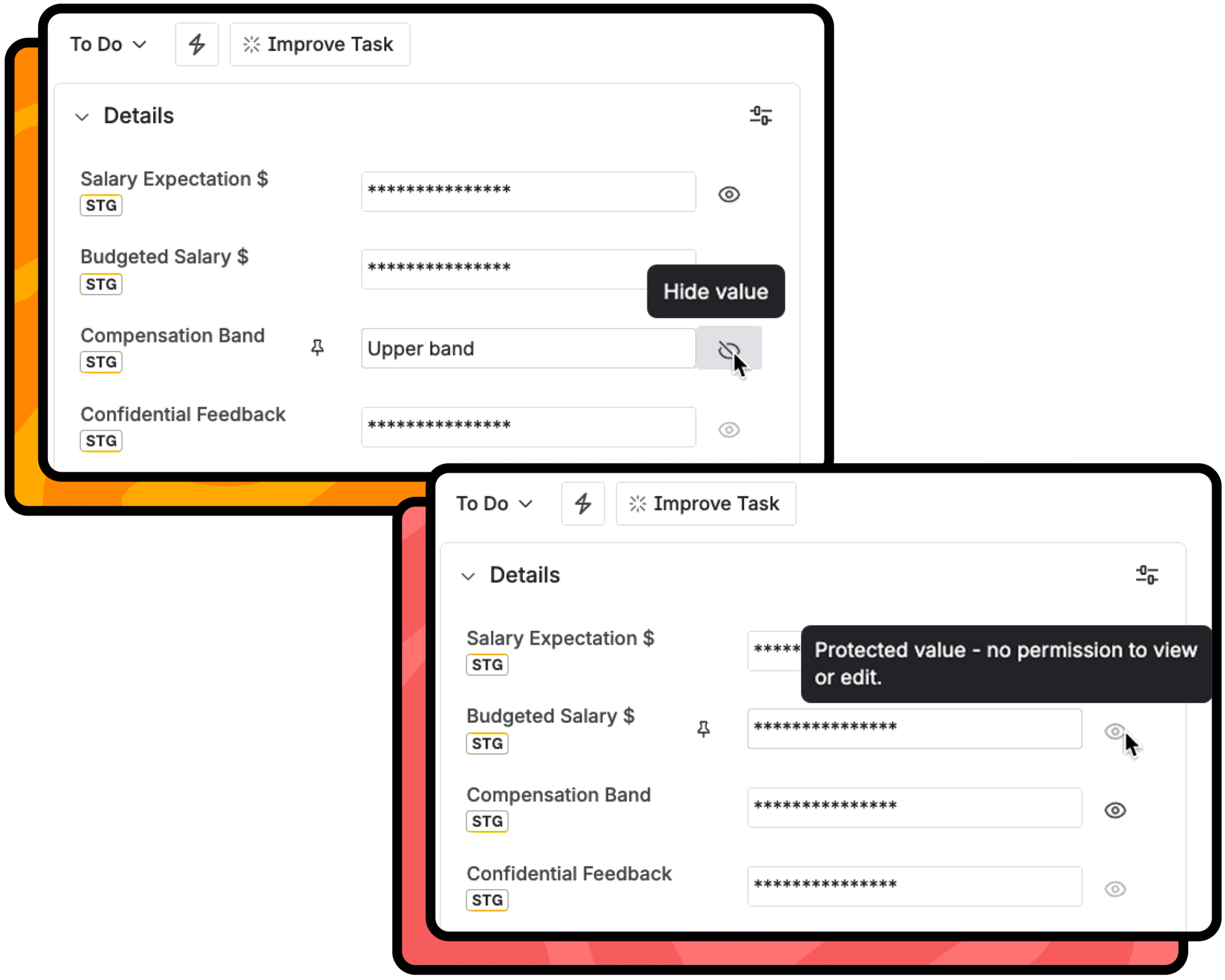
The view an end user has when custom fields are secured in Jira and JSM

Full control and security for your custom fields in Jira and JSM

Protect sensitive data without locking down everything else

Jira and JSM Cloud don't offer native custom field-level security, so teams end up restricting access to entire work items or cloning spaces just to hide one sensitive field.
With Protected Custom Fields, you can protect individual custom fields while keeping everything else visible. Your teams keep collaborating on the same work items, only the sensitive data is restricted to authorised user groups.
An illustration of Jira work items with padlocks over them and fields masked from view

Keep sensitive data encrypted and access tightly scoped

Unauthorised users never receive the masked data in their browser thanks to AES-256 encryption, enforcing the principle of least privilege at the custom field level, not just the space level.
Because access is managed through groups rather than individual users, permissions stay in sync as people move teams or leave the organisation. No manual cleanup required!
An illustration of a Jira board with two profile icons overlaid on top and two work items, one with encrypted information on

A complete audit trail your compliance team can actually use

Every permission change, field creation, deletion, and access event on your secured custom fields is recorded in a detailed audit log.
Your security and compliance teams get the traceability they need for audits and reviews, without manually tracking down information across multiple teams and tools.
An illustration of a screen with an audit log on showing profile pictures and audit activity on the screen, with extra style elements including a checklist, magnifying glass and a padlock
Jira and JSM Cloud don't offer native custom field-level security, so teams end up restricting access to entire work items or cloning spaces just to hide one sensitive field.
With Protected Custom Fields, you can protect individual custom fields while keeping everything else visible. Your teams keep collaborating on the same work items, only the sensitive data is restricted to authorised user groups.
Unauthorised users never receive the masked data in their browser thanks to AES-256 encryption, enforcing the principle of least privilege at the custom field level, not just the space level.
Because access is managed through groups rather than individual users, permissions stay in sync as people move teams or leave the organisation. No manual cleanup required!
Every permission change, field creation, deletion, and access event on your secured custom fields is recorded in a detailed audit log.
Your security and compliance teams get the traceability they need for audits and reviews, without manually tracking down information across multiple teams and tools.
An illustration of Jira work items with padlocks over them and fields masked from view
An illustration of a Jira board with two profile icons overlaid on top and two work items, one with encrypted information on
An illustration of a screen with an audit log on showing profile pictures and audit activity on the screen, with extra style elements including a checklist, magnifying glass and a padlock
Jira and JSM Cloud don't offer native custom field-level security, so teams end up restricting access to entire work items or cloning spaces just to hide one sensitive field.
With Protected Custom Fields, you can protect individual custom fields while keeping everything else visible. Your teams keep collaborating on the same work items, only the sensitive data is restricted to authorised user groups.
An illustration of Jira work items with padlocks over them and fields masked from view
Unauthorised users never receive the masked data in their browser thanks to AES-256 encryption, enforcing the principle of least privilege at the custom field level, not just the space level.
Because access is managed through groups rather than individual users, permissions stay in sync as people move teams or leave the organisation. No manual cleanup required!
An illustration of a Jira board with two profile icons overlaid on top and two work items, one with encrypted information on
Every permission change, field creation, deletion, and access event on your secured custom fields is recorded in a detailed audit log.
Your security and compliance teams get the traceability they need for audits and reviews, without manually tracking down information across multiple teams and tools.
An illustration of a screen with an audit log on showing profile pictures and audit activity on the screen, with extra style elements including a checklist, magnifying glass and a padlock

Custom field security and control, without the complexity

Set granular view and edit permissions on your sensitive custom fields in minutes. No workarounds, scripting, or complex permission schemes needed.

Sensitive data stays hidden until the right person needs it

All protected custom field values are hidden by default and encrypted. Decryption only happens for users with the right permissions, reinforcing the principle of least privilege and making sure sensitive data is never exposed to anyone who doesn't need access.
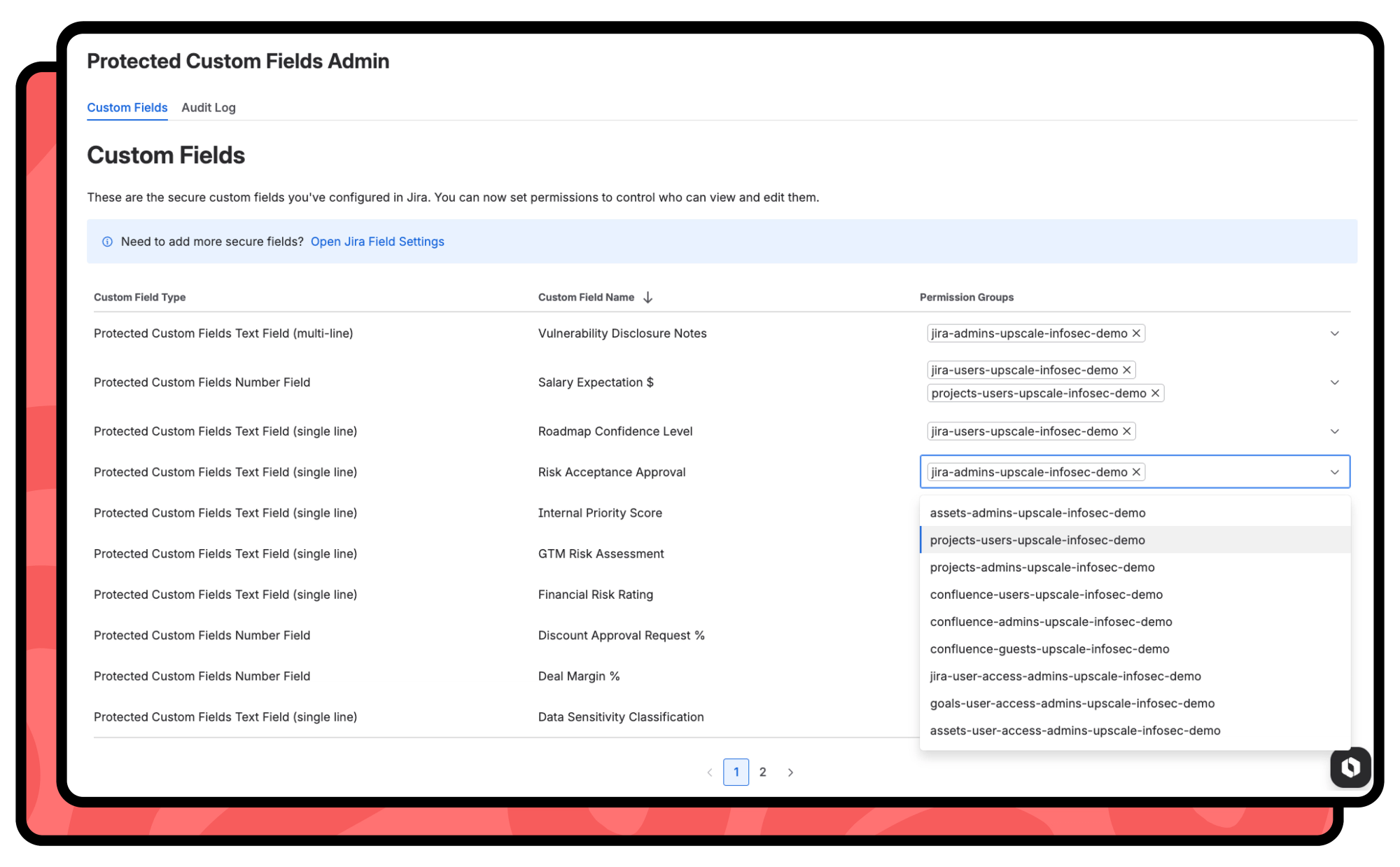
Admin screen in Protected Custom Fields for Jira and JSM

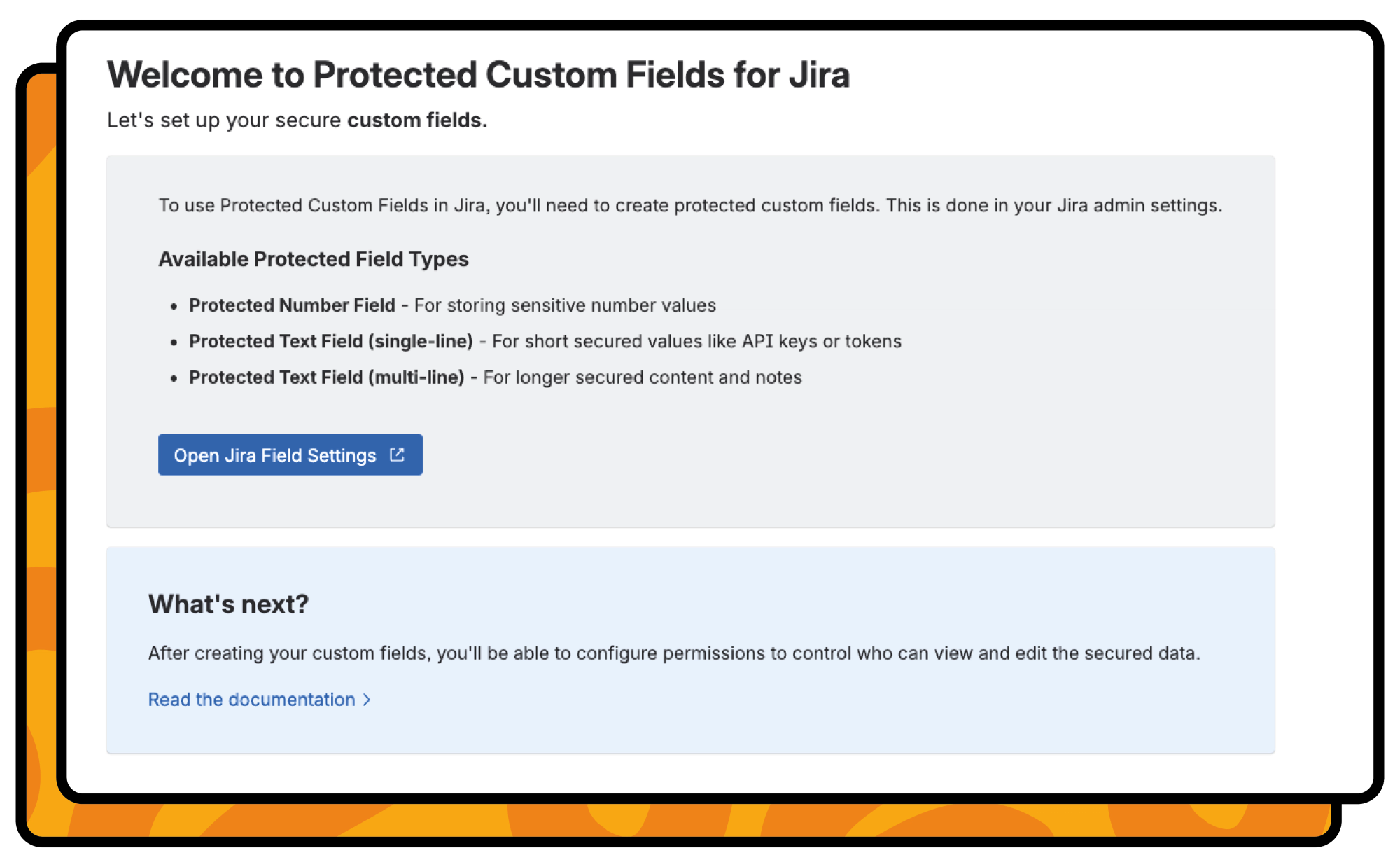
Set up your custom field permissions in minutes

Choose any custom field, assign which Jira user groups can view or edit that field, and you're done. Setup takes just minutes using the Jira user groups you already have in place.
Protected Custom Fields admin screen

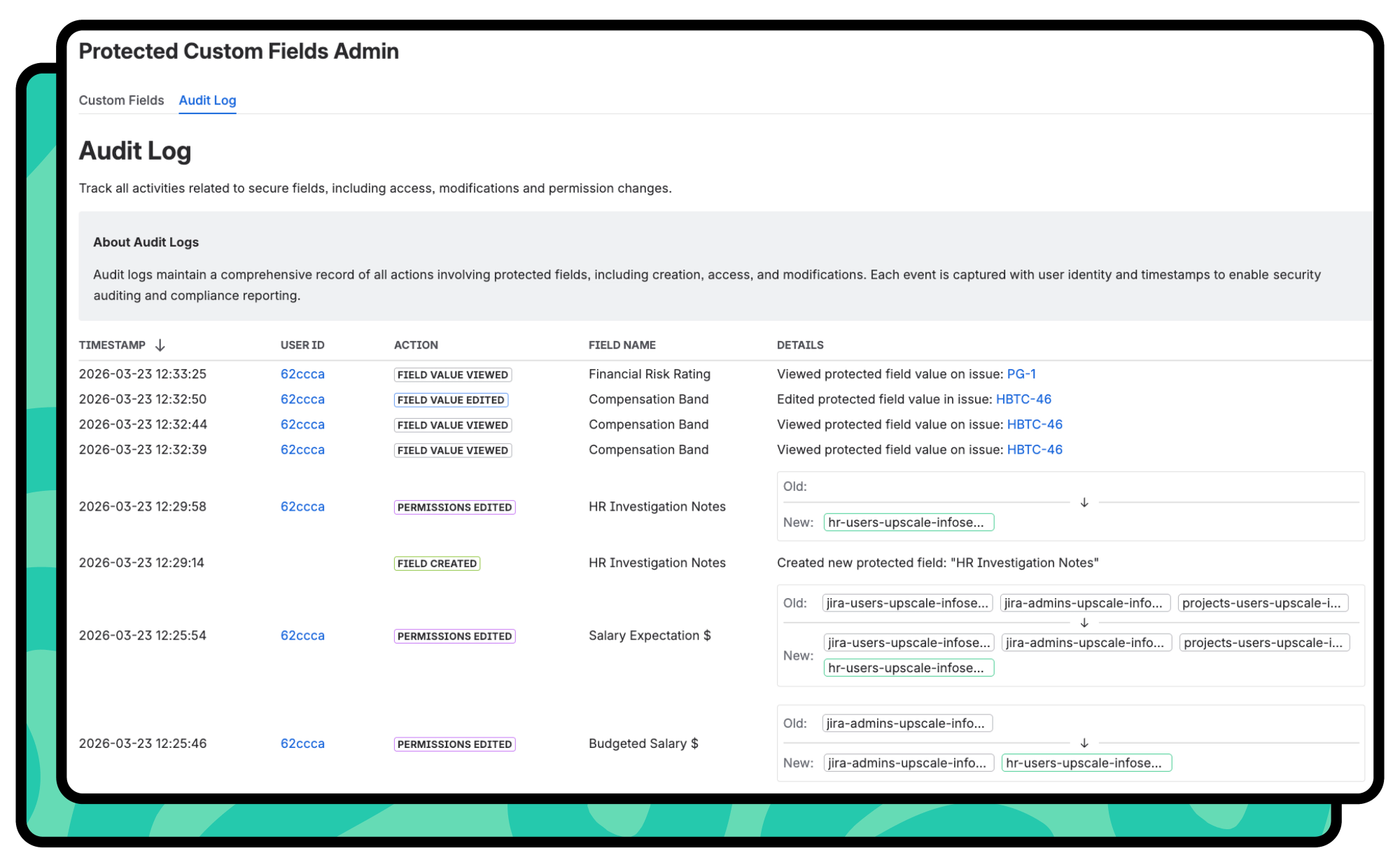
Track actions with a built-in audit log for full traceability

Every action taken by your team on your protected fields is logged automatically. Your compliance team gets the traceability they need, without manually chasing anyone down.
The audit log showing which secure custom fields have been edited

Ready to upgrade your custom field security?

Head to the Atlassian Marketplace, install the app, and start securing your custom fields with our free app for Jira and JSM Cloud.

Who is Protected Custom Fields for?

Custom field-level security for your teams on Jira and JSM that work with sensitive data.
Checkmark icon

Jira admins

You shouldn't need to clone a project or build a complex permission scheme just because one custom field contains salary data. Set up custom field-level permissions in minutes, using the Jira groups you already manage, all from one easy-to-use interface.
lock icon

Compliance teams

When an auditor asks, "Who had access to this field and when?", you want the answer in one click. With role-based access control and a built-in audit log, you get the controls you need to meet enterprise security standards, simplify audits, and enforce the principle of least privilege inside Jira and JSM.
Speech bubble icon

For service desk teams

Your customers submit sensitive details through JSM every day: account numbers, PII, and contractual details. With your protected custom fields, your sensitive customer data is only visible to agents and teams within your authorised user groups, never to anyone else with access to the service desk.
A safe icon

Teams handling sensitive data

Your finance, HR, legal, and operations teams already work in Jira and JSM. Now, they can store Personally Identifiable Information (PII), salaries, legal notes, and customer details directly in their everyday platforms, with confidence that only the right people can see it.

Frequently Asked Questions

What is Protected Custom Fields?
Protected Custom Fields is a Cloud app for Jira and Jira Service Management that gives you field-level access control for custom fields, allowing you to store sensitive data in Jira and JSM with confidence that only the right groups have view and edit access.
It's ideal for Jira administrators, security and compliance teams, and any organisation that stores sensitive data in Jira. Whether you’re protecting financial information, HR or salary data, legal notes, or confidential customer details, Protected Custom Fields keeps that data visible only to the right people.
You choose which custom fields to protect and specify which Jira groups can access them. Users in authorised groups can reveal and interact with the custom field value, while everyone else sees a masked field and cannot access its contents, enforcing role-based access control and the principle of least privilege at the field level.
Permissions are assigned using your existing Jira groups. There's no new permission model to learn. Simply select which groups have view and/or edit access to each protected field. If someone is added to the wrong user group, the audit log makes it easy to identify what they accessed and when, so you can respond quickly.
Protected Custom Fields is an app for Jira and JSM Cloud, built on Atlassian Forge. It’s made for teams with strict data privacy and governance requirements and runs on Atlassian-hosted infrastructure.
All protected custom field values are encrypted using AES-256 and only decrypted for authorised users. The app is built on Atlassian's Forge platform, with both your data and encryption keys stored securely within Atlassian's infrastructure. Encryption keys are never directly accessible to end users or administrators.
Your protected custom field data is never exposed to Rovo or any other AI-powered feature. If a user doesn't have permission to see a protected custom field, neither does Rovo. Your sensitive data is revealed only to people in your user groups with the required access permissions.
Protected Custom Fields is available as a free app. Head to the Atlassian Marketplace to find the app and install it!

We're here to help

Dive into our resources to discover everything from expert tips and tricks to personalised advice on getting the most out of Protected Custom Fields.
document icon

Documentation

Get up to speed with Protected Custom Fields with our detailed documentation. You’ll see the latest release notes, tips on getting started, and more.
Read the documentation
lightbulb icon

Product support

Visit our product support portal to ask our friendly support team any questions you have about using Protected Custom Fields in your Jira and JSM Cloud instances. We're here to help!
Visit support

Ready to secure your custom fields and protect sensitive data?

Set up field-level access control in minutes using your existing Jira groups, hide sensitive data from anyone who doesn’t need access, and give your compliance teams a full audit trail, all without limiting access to entire spaces. Get started for free on the Atlassian Marketplace.